Resolve Transcript to Readable Dialogue
How I turned Resolve transcript exports into readable interview dialogue with a small Python utility that removes friction from editorial and publishing workflows.
When working on interviews or documentaries, DaVinci Resolve’s transcription tool is a lifesaver. It can automatically generate a text transcript of a timeline, complete with speaker detection.
But the output format isn’t exactly something you’d want to hand over to a client or drop straight into an article.
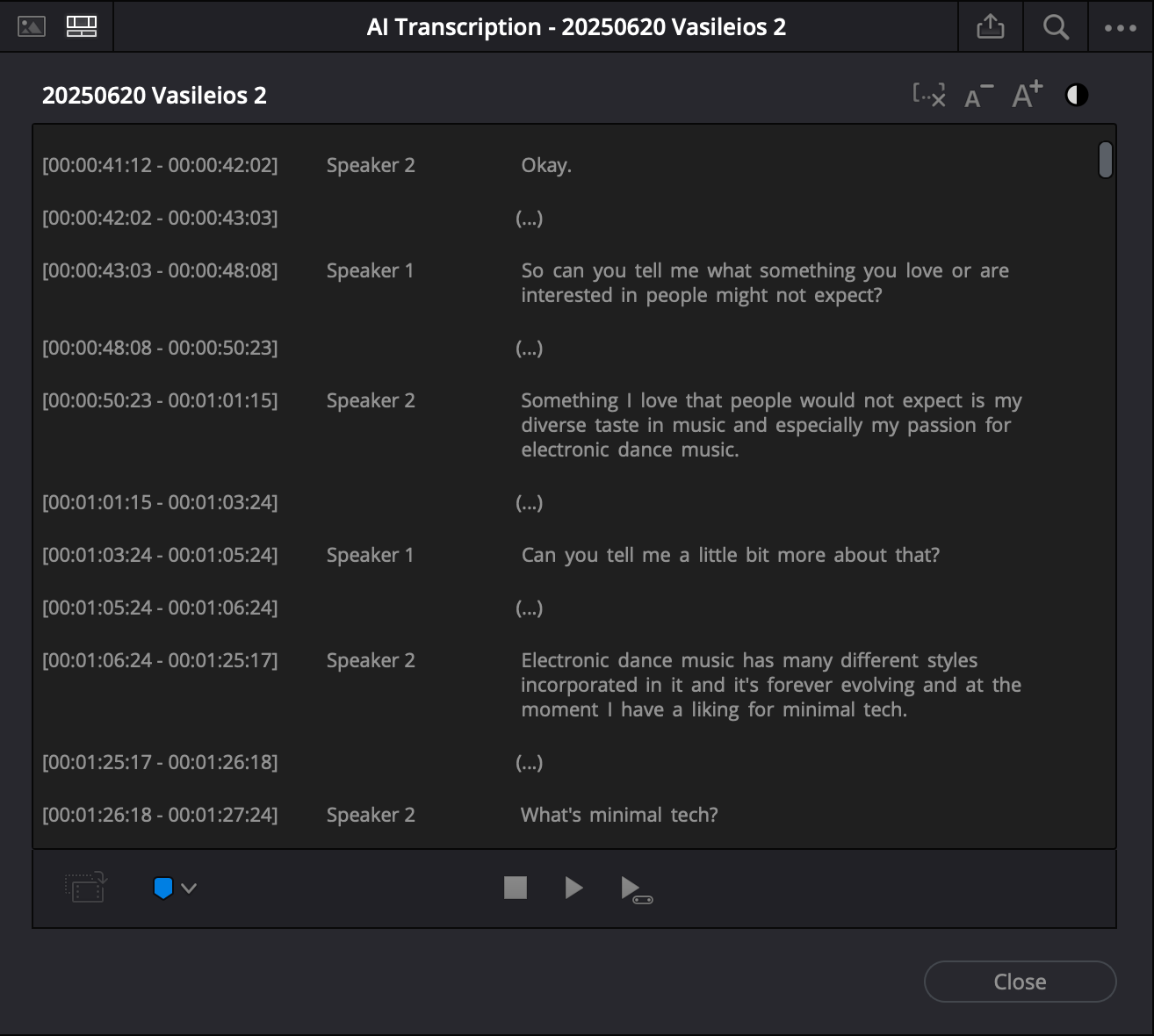
For example, exporting a transcript with “Detect Speaker” enabled gives you something like this:
[00:00:43:03 - 00:00:48:08]
Speaker 1
 So can you tell me what something you love or are interested in people might not expect?

[00:00:50:23 - 00:01:01:15]
Speaker 2
 Something I love that people would not expect is my diverse taste in music and especially my passion for electronic dance music.
This is great for editing reference, but clunky for storytelling.
It has timecodes, generic “Speaker 1 / Speaker 2” labels, and breaks every few seconds.
What we actually want is something more natural, like a written Q&A:
Justin: So can you tell me what something you love or are interested in people might not expect?

Vasileios: Something I love that people would not expect is my diverse taste in music and especially my passion for electronic dance music.
The Solution: Clean Transcript Script
To fix this, I wrote a Python script that:
- Removes timecodes like
[00:00:43:03 - 00:00:48:08] - Maps speaker numbers to real names (e.g.
Speaker 1 → Justin,Speaker 2 → Vasileios) - Merges consecutive blocks from the same speaker, so the dialogue flows naturally
You can find the full script here: 👉 GitHub – clean_transcript.py
How to Use It
Save your Resolve transcript as a text file, then run the script from the terminal.
Basic syntax:
python clean_transcript.py input.txt -o output.txt --s1 "Justin" --s2 "Vasileios"input.txt→ the raw transcript exported from Resolve-o output.txt→ the cleaned transcript output file (optional; if omitted, prints to console)--s1 "Justin"→ replaces Speaker 1 with Justin--s2 "Vasileios"→ replaces Speaker 2 with Vasileios
You can also adjust: --sep → separator between merged speaker blocks (default is a blank line).
Full Python Script
#!/usr/bin/env python3
"""
Author: Matteo Curcio
Website: https://matteocurcio.com
Email: hello@matteocurcio.com

Description:
    Clean Resolve transcripts by:
    - Removing timecode lines like [00:00:43:03 - 00:00:48:08]
    - Mapping 'Speaker 1' / 'Speaker 2' to user-defined names
    - Merging consecutive blocks from the same speaker

Usage:
    python clean_transcript.py input.txt -o output.txt --s1 "Name1" --s2 "Name2"

Example:
    python clean_transcript.py raw.txt -o clean.txt --s1 "Justin" --s2 "Vasileios"
"""

import argparse
import re
from pathlib import Path

TIMECODE_RE = re.compile(
    r'^\s*\[\d{2}:\d{2}:\d{2}:\d{2}\s*-\s*\d{2}:\d{2}:\d{2}:\d{2}\]\s*$'
)
SPEAKER_LINE_RE = re.compile(r'^\s*(Speaker)\s+(\d+)\s*$', re.IGNORECASE)

def parse_args():
    ap = argparse.ArgumentParser()
    ap.add_argument("input", type=Path, help="Input transcript text file")
    ap.add_argument("-o", "--output", type=Path, help="Output file (default: stdout)")
    ap.add_argument("--s1", default="Speaker 1", help="Name for Speaker 1")
    ap.add_argument("--s2", default="Speaker 2", help="Name for Speaker 2")
    ap.add_argument("--sep", default="\n\n", help="Separator between merged blocks")
    return ap.parse_args()

def speaker_name(raw: str, s1: str, s2: str) -> str:
    m = SPEAKER_LINE_RE.match(raw)
    if not m:
        return raw.strip()
    num = m.group(2)
    if num == "1":
        return s1
    if num == "2":
        return s2
    # Leave Speaker 3+ unchanged but normalized
    return f"Speaker {num}"

def clean_lines(lines, s1, s2):
    blocks = []  # list of (speaker, text_string)
    cur_speaker = None
    cur_text_parts = []

    def flush():
        nonlocal cur_speaker, cur_text_parts
        if cur_speaker is not None:
            text = " ".join(" ".join(cur_text_parts).split())  # collapse whitespace nicely
            blocks.append((cur_speaker, text))
        cur_speaker = None
        cur_text_parts = []

    i = 0
    n = len(lines)
    while i < n:
        line = lines[i].rstrip("\n")
        # Skip pure timecode lines
        if TIMECODE_RE.match(line):
            i += 1
            # Next non-empty line should be the speaker label
            while i < n and lines[i].strip() == "":
                i += 1
            if i < n:
                sp_line = lines[i].rstrip("\n")
                if SPEAKER_LINE_RE.match(sp_line):
                    sp = speaker_name(sp_line, s1, s2)
                    # If new block speaker differs from current speaker, flush
                    if cur_speaker is None:
                        cur_speaker = sp
                    elif sp != cur_speaker:
                        flush()
                        cur_speaker = sp
                    # Consume speaker line and continue collecting text
                    i += 1
                    # Collect text lines until next timecode or blank+timecode pattern
                    while i < n and not TIMECODE_RE.match(lines[i]):
                        txt = lines[i].strip()
                        if txt != "":
                            cur_text_parts.append(txt)
                        i += 1
                    # Do not flush yet; we might merge with next block if same speaker
                    continue
                else:
                    # Unexpected line, treat as text under current speaker (if any)
                    if sp_line.strip():
                        if cur_speaker is None:
                            # Unknown speaker: label as 'Unknown'
                            cur_speaker = "Unknown"
                        cur_text_parts.append(sp_line.strip())
                    i += 1
                    continue
            else:
                # End after a timecode line: flush whatever we had
                break
        else:
            # Non-timecode line outside the expected structure.
            # If it's a speaker line, handle similarly.
            if SPEAKER_LINE_RE.match(line):
                sp = speaker_name(line, s1, s2)
                if cur_speaker is None:
                    cur_speaker = sp
                elif sp != cur_speaker:
                    flush()
                    cur_speaker = sp
            else:
                if line.strip():
                    if cur_speaker is None:
                        cur_speaker = "Unknown"
                    cur_text_parts.append(line.strip())
            i += 1

    # Flush at end
    flush()
    return blocks

def format_blocks(blocks, sep="\n\n"):
    out_lines = []
    last_speaker = None
    for sp, text in blocks:
        if sp != last_speaker:
            out_lines.append(f"{sp}: {text}")
            last_speaker = sp
        else:
            out_lines[-1] = out_lines[-1] + " " + text
    return sep.join(out_lines).strip() + "\n"

def main():
    args = parse_args()
    raw = args.input.read_text(encoding="utf-8").splitlines()
    blocks = clean_lines(raw, args.s1, args.s2)
    result = format_blocks(blocks, sep=args.sep)
    if args.output:
        args.output.write_text(result, encoding="utf-8")
    else:
        print(result, end="")

if __name__ == "__main__":
    main()
Why This Matters
Instead of spending hours cleaning transcripts manually, this script automates the process in seconds. You get a clean, readable dialogue format ready for:
- Blog posts
- Interview articles
- Subtitles or captions
- Documentary scripts
This keeps the creative process moving instead of bogging down in formatting work.
🔗 Full code and documentation: clean_transcript.py on GitHub